




Run your whole school from one calm, connected place.

GradePulse gives administrators one calm place to run the whole school — fees, attendance, timetable, report cards, exams, payroll, transport, accounts, library, clinic, elections and assets — with secure, isolated data for every school, and the register, marks and a family's account in the palm of the teacher's or parent's hand.

AS MS AM + Trusted by 21 active schools on the platform
GradePulse · Dashboard
Termly Reports
2025/2026 · Term 2
• Live
1,240Students
48Classes
12Subjects
✓ Report card generated
↑ 36 students promoted
21 Active featured schools
20 Integrated modules
100% Per-school data isolation

One platform, every department

From academics and fees to transport, health, and assets — every part of your school stays connected in one place.

Student & Class Management

Keep every learner organised — enrolment, classes, subjects, attendance and parent contacts in one place.

Results & Broadsheets

Enter scores, auto-compute totals and grades, and generate class and subject broadsheets instantly.

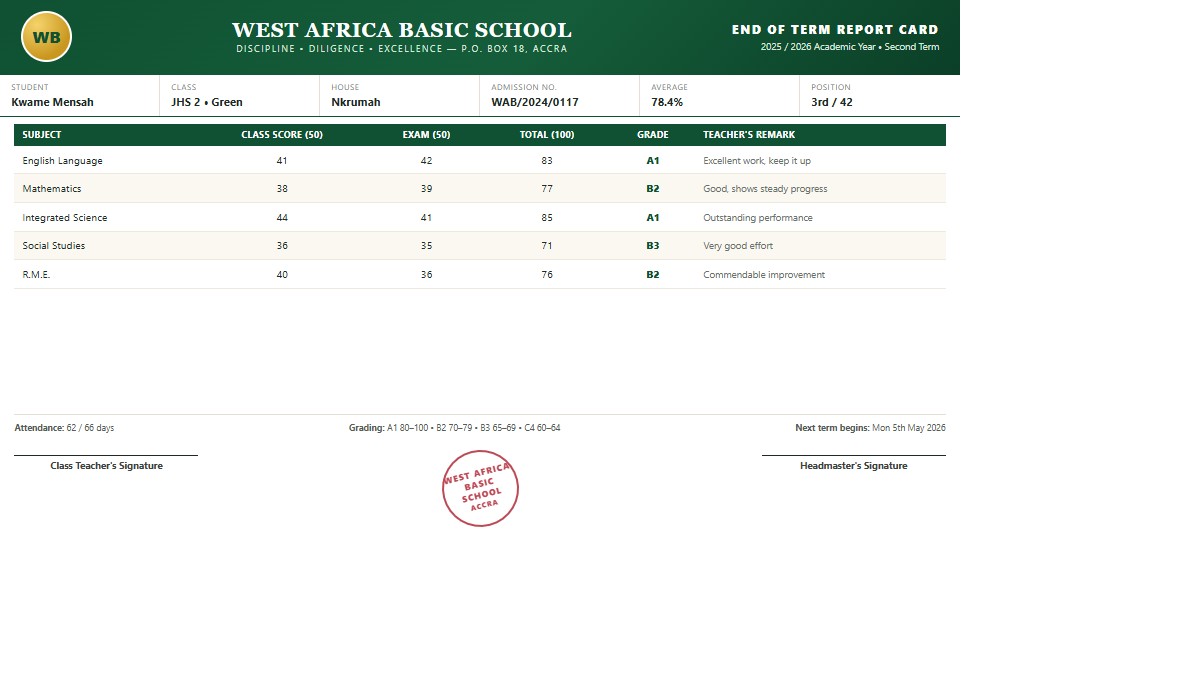
Report Cards & Promotions

Produce beautiful, branded report cards and seamlessly promote or graduate students between terms.

House Management
House Management

Create houses, auto-balance students by gender, track merits and prefects, and issue prefect certificates.

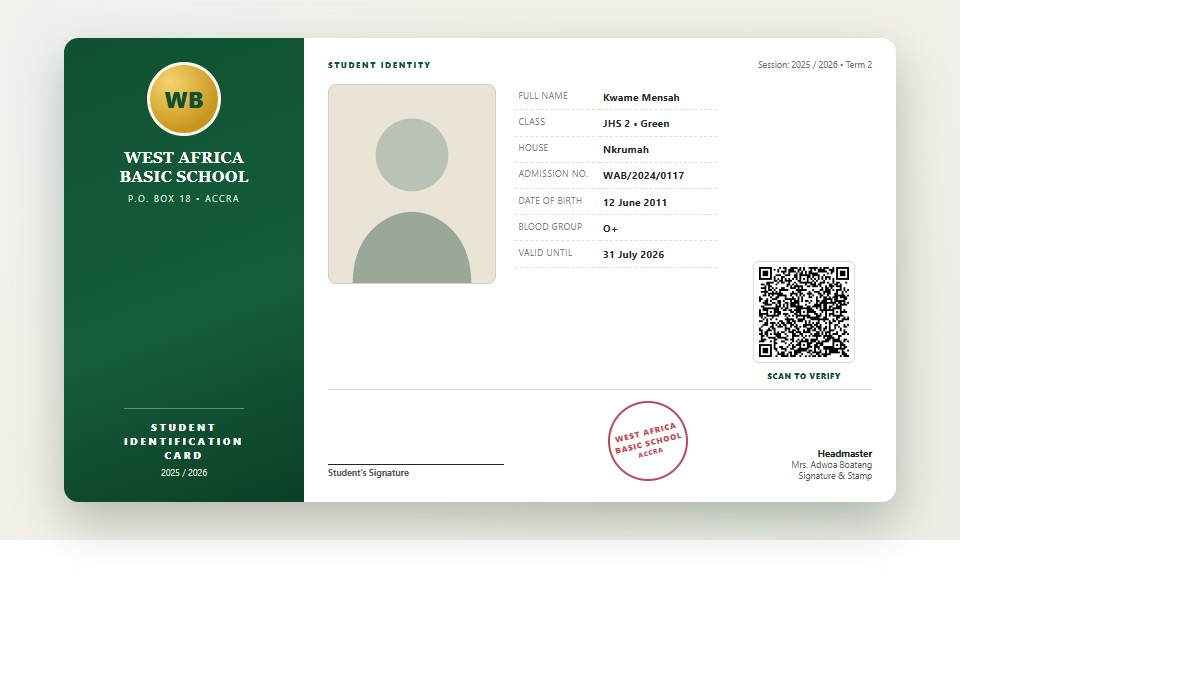
ID Cards & QR Verification

Print branded student ID cards with scannable QR codes that verify a student's identity online.

School Branding & Documents

Carry your school's colours and logo across report cards, transcripts, transfer letters and ID cards.

Fee Management & Billing

Bill, collect and reconcile school fees with receipts, payment tracking and online Paystack payments.

A complete suite of 20 modules

Beyond academics, run every department of your school from one connected workspace.

Academics & Results

Classes, subjects, score entry, broadsheets, marks conversion, and timetables.

Report Cards & Transcripts

Professional, printable report cards and cumulative transcripts.

Class Teacher Tools

A class teacher keeps their own class list and reads the class broadsheet for the class they lead.

Fees & Billing

Fee structures, payments, invoices, discounts, fines, and refunds.

Online Payments

Families pay school fees by card or mobile money from the fee statement; each payment is confirmed and receipted.

Payroll & Staff

Staff records, salary structures, payroll runs, and payslips.

Attendance

Student and staff attendance with QR check-ins and geofencing.

Staff Self Check-in

A teacher or administrator checks themselves in from the phone with the code the school displays and the phone's own position.

Register Records by Pupil

Every pupil's present, late, absent and excused totals over a period, with the days the register was actually taken.

Discipline & Houses

Discipline cases, behavior points, and house management.

Transportation & GPS

Vehicles, routes, stops, bus attendance, and live GPS tracking.

Accounts & Finance

Chart of accounts, income, expenses, budgets, and cash/bank.

Library

Books, members, issue and return, fines, and reservations.

Health & Clinic

Medical profiles, visits, medicines, sick beds, and referrals.

Visitors & Gate Pass

Visitor check-in/out, blacklist, and student exit logs.

Procurement & Store

Stores, items, suppliers, requests, orders, and issues.

Elections

Prefect and student council elections with voting and results.

Property & Assets

Asset registry, maintenance, warranties, and consumables.

Parent Portal & SMS

Parent portal, result SMS, and email documents.

Analytics & Audit

School analytics, at-risk insights, and a full audit trail.

Featured schools

A spotlight of active schools currently using the platform.

Real experiences

What people say

School leaders use GradePulse to make reporting and academic administration more reliable.

“
★★★★★

We cut report processing time drastically. GradePulse gave our campuses a single, reliable reporting process.

HeadMaster profile photo
HeadMaster
Asuotiano St. Peter's Junior High School
“
★★★★★

Analytics and parent messaging improved follow-up on at-risk students and gave us faster intervention cycles.

HOD ICT Department profile photo
HOD ICT Department
Mansen Senior High School
“
★★★★★

From grading to report exports, the workflow is clear for staff and dependable during term-end pressure.

School Administrator profile photo
School Administrator
Amasu M/A Junior High School
Android app

Take the register, mark your own attendance and enter marks from your phone

The GradePulse app is the same system in your hand: sign in with your school account — staff or parent — and a teacher sees the classes they hold and the pupils in them, the day's register beside the class's own register records, marks entry and the broadsheets they are entitled to, their timetable and their duties, and can mark their own attendance at the school gate. A parent sees their children's marks and fees. Everything is saved straight into the records the office already uses.

1
Download the app

Tap the download button and keep the file. It is your school's own copy of the app — the phone signs in to your school, nobody else's.

2
Allow this one installation

Android will ask whether to allow installing apps from your browser or file app. Allow it for this file, then open the download to install.

3
Sign in with your school account

Use the username and password your school gave you — that is all. If your account requires a verification code, it is emailed to you and the app asks for it.

GradePulse for Android

Version 0.1.0+16 · 18.2 MB

Requires Android 7.0 (Nougat) or newer. The download is the right build for your phone automatically — nothing to choose.

Download the app

older 32-bit phone (15.9 MB)

SHA-256 of the download above (compare it if you want to be certain the file arrived intact):
3e981eeafa25903404a8b0211ec0c9f882a5cbabdfadf4c83d0be28c05c2488f

Today the app covers signing in (staff and parents); your classes and their pupils, including keeping your own class list; the day's register and what that register adds up to, pupil by pupil; marks entry, the marks converter and the broadsheets you may see; your timetable, your duties and your signature; and your own attendance check-in. Everything else stays on the web for now.

Questions

Frequently asked questions

The questions schools ask us most. Anything else, ask while registering and we will walk you through it.

How do we get our school started?

Register your school from the registration page, pay the setup fee by card or mobile money through Paystack, and your account is activated. You then add your classes, subjects, students and staff at your own pace.

Do teachers and bursars get their own logins?

Yes. Every staff member has their own username and role, and only sees the sections that role covers. A user manual is built into the app, so new staff can read the steps for their own screens.

How do parents see results and report cards?

Parents sign in to the Parent Portal with the account you create for them and see their child's performance, attendance, conduct, fees, report cards, house, discipline, gate passes, library and clinic records. You can also text each parent a private link that opens their child's report card as a PDF, with no login needed.

Can the system text parents?

Yes — report card links, payment confirmations, outstanding fee reminders, and alerts from attendance, transport, library, clinic and the school gate. Fee reminders reach every parent with a balance in a single click.

Who pays for the SMS messages?

Your school does, and you choose the gateway. Connect your own BulkSMS GH account (or another provider) so messages carry your sender ID and use your credits, or use the shared platform gateway. Your provider bills per message sent.

How do we handle fees, discounts and refunds?

Set up a fee structure once, apply it to a class or a single student, then record payments in instalments — each payment produces a numbered receipt. Scholarships and bursaries, fines and refunds all feed the same balance, so the debtor list, dashboard and reports always agree.

Do we have to type in every student ourselves?

No. Bulk Upload brings in a whole class or school from a CSV file, and staff can be bulk uploaded the same way. Records and parent contact details can be corrected at any time afterwards.

Can one account manage several schools?

Yes. A proprietor or group can run several schools from one login and switch between them, with each school's classes, staff, results and finances kept separately.

Is our data safe, and can we keep copies?

Each school's records are kept apart from other schools', and sensitive changes are written to an audit trail you can review. The database can be backed up and restored with the tools included, and report cards, receipts and ID cards are produced as PDFs you keep.

What do we need in order to use it?

Any modern browser — phone, tablet or computer — and an internet connection. There is nothing to install in the browser, and anything you print is generated as a PDF. Staff and parents may also install the GradePulse Android app (see the section above): it does the same work against the same records, and nothing is stored on the phone except a sign-in token.

Can parents pay school fees online?

Yes. A parent sees each child's fee statement in the Parent Portal and in the app, with the balance outstanding, and can pay by card or mobile money straight from that statement. The payment is confirmed back to your school automatically, a numbered receipt is produced, and any part payment simply reduces the balance — the debtor list, dashboard and reports agree with it immediately.

Fast setup

Simple onboarding

1
Register your school

Provide school and admin details from the registration page.

2
Complete setup payment

Secure checkout and verification complete the account activation.

3
Start managing your school

Access your dashboard and begin managing data immediately.

Ready to digitize your school workflow?

Join schools using School Reports to streamline academics, finance, and operations in one place.